DocumentationGetting startedYour first fee
Your first fee
Six steps to charge a fee on one payment method: switch the method on, enter the amount, name the fee, set tax, save, check it at checkout. This walkthrough uses a cash-on-delivery fee, but every fee is the same six steps. None of it needs Pro.
1. Open the settings screen
WooCommerce → Settings → Pay for Payment. Every payment gateway your store has is listed on the left, whether or not it is switched on in WooCommerce — so you can set a fee up before a gateway goes live. Gateways with settings screens of their own, such as WooPayments, Stripe and Klarna, are on this list too. Fees live here, not on the gateway’s own page.

2. Switch the method on
Pick Cash on delivery in the list and tick Charge an extra fee when customers pay with Cash on delivery. This switch decides whether anything is charged at all: a method that is off charges nothing, whatever its fields say.
A store upgrading from version 2 gets every method it had configured switched on automatically — including one whose amount was zero but that carried a title, caps or a tax setting.
3. Enter the amount
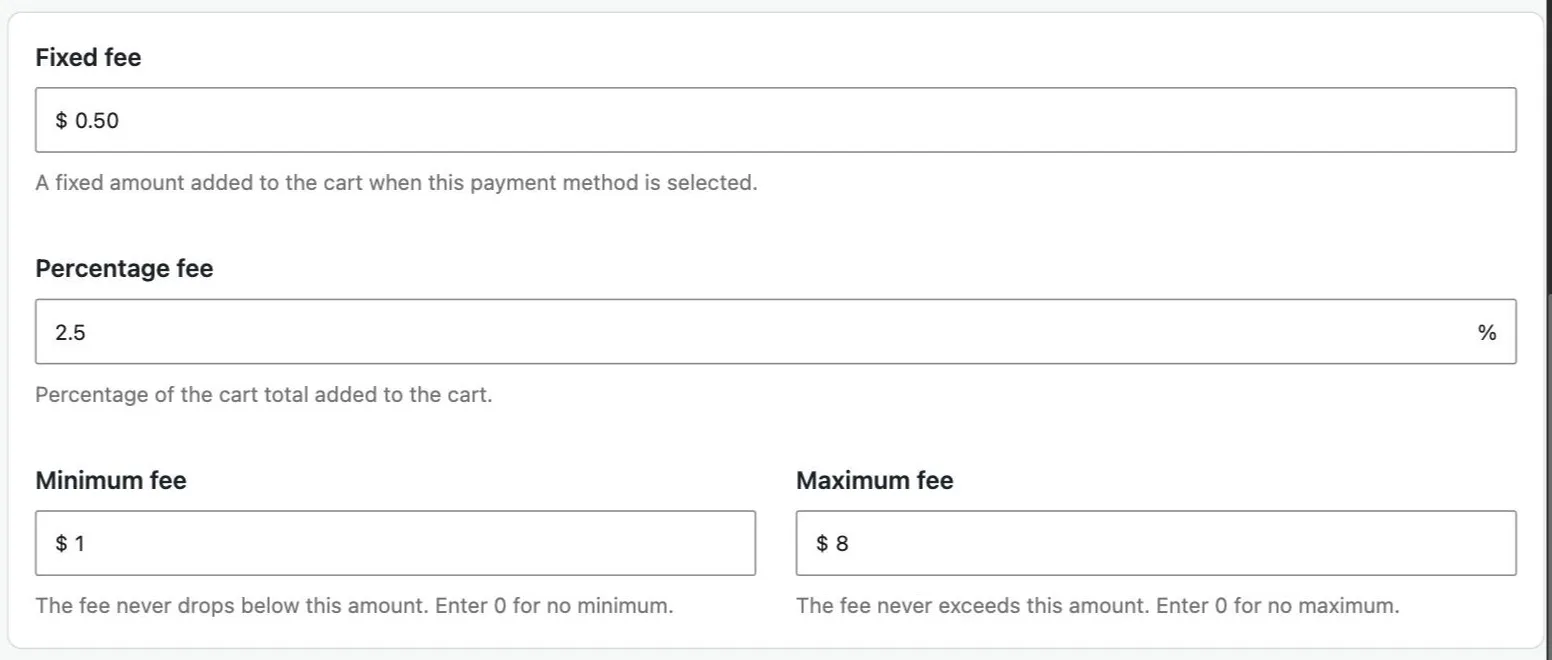
Three fields, and you can fill in one or both of the first two:
| Field | What it does |
|---|---|
| Fixed fee | A flat amount added to every order paid this way. |
| Percentage fee | A share of the cart: the subtotal plus the cart’s tax, because the Taxes box starts ticked. The checkboxes underneath add shipping or other fees, subtract coupons, or take the tax back out. |
| Minimum and maximum | Appear once a percentage is entered. The fee is clamped to stay between them, so small orders are not punished and big ones are not overcharged. |
For a cash-on-delivery fee that covers a courier’s cash-handling charge, a typical rule is 2.5 % + 0.50, minimum 1, maximum 8. On a 110 basket that is 3.25; on a 10 basket it is the minimum, 1.00.
The whole calculation, step by step, is on how the amount is calculated.
4. Name it
The fee label is what the customer reads on the cart, at checkout, in the order email and on the invoice. “COD surcharge” and “Cash handling fee” both work. Say why the fee exists and you will answer fewer emails about it.
Five placeholders fill the numbers in for you, so a title like Cash on delivery ([PERCENT_AMOUNT]% + [FIXED_AMOUNT]) renders as Cash on delivery (2.5% + $0.50). They are listed on fee title placeholders.
Leave the label empty and the plugin uses the payment method’s own name followed by “fee”.
5. Tax and free shipping
Two more decisions on the same panel, both with sensible defaults:
- Payment fee is taxable is off by default — turn it on if the fee should carry tax. Fee amount already includes tax is then on, as in version 2: the number you typed is what the customer pays, and the tax inside it is worked out for the order. The tax class defaults to the standard rate; tax handling covers the rest, including the “inherit from cart items” class.
- Don’t charge the fee when free shipping is available or when shipping costs nothing. Tick these if the fee is really about the courier — a cash-on-delivery fee usually is.
6. Save and check it at checkout
Save. Then put something in the cart, go to checkout and pick cash on delivery: the fee appears as its own line in the order totals, and it recalculates the moment the shopper changes payment method — on the classic checkout and on the block checkout alike.
The cart page shows a fee too. It has to guess which method the shopper will use, so it shows the default one’s fee. If that confuses your shoppers, reorder your payment methods so a fee-free one comes first. Pro can hide the cart fee entirely.
What next
- A discount instead of a fee — for bank transfer, say — is the same form with a negative number. See discounts.
- The same fee on several methods is set up per method; there is no copy button, and a fee that differs per method is the point.
- One rule is not enough — no fee above a threshold, a different fee for export orders, no card fee for wholesale customers — is what conditions and fee tiers are for. Both are Pro.
Want a different fee on large baskets, or none at all for wholesale customers? That is a second rule with a condition on it, which is Pro.
See what Pro adds