DocumentationProConditions
ConditionsPro
A condition makes a fee apply only to orders that match it — over 1,000, paying with a coupon, shipping abroad. There are nine kinds, and a rule applies when all of its conditions match. Conditions are a Pro feature; the free version stores them but ignores them.
What a condition can look at
| Condition | Looks at | Operators |
|---|---|---|
| Cart total | The cart subtotal as the customer sees it: with or without tax the way your store shows prices, before coupons, and without shipping. | at least / at most |
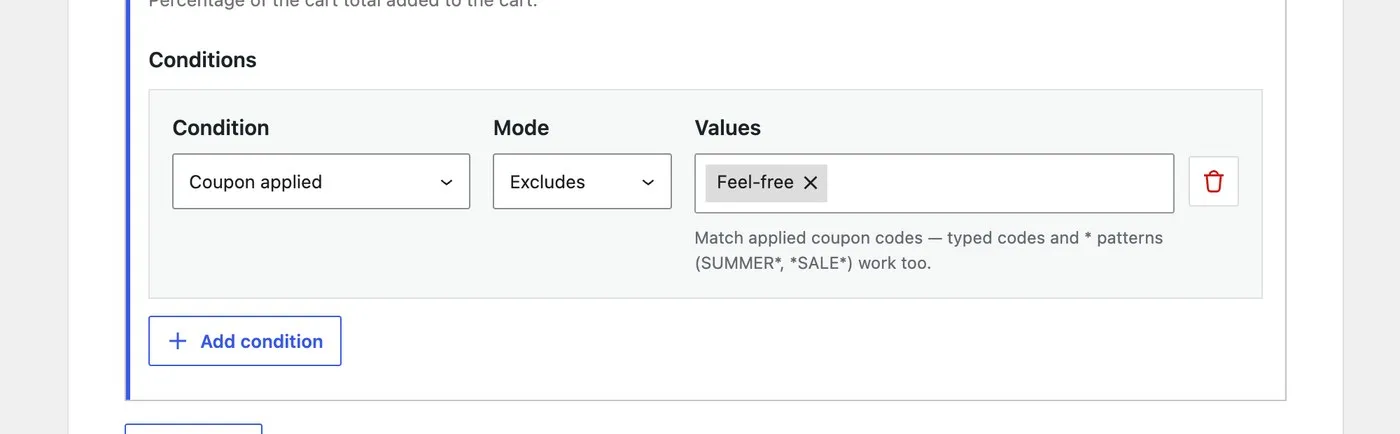
| Coupon applied | The coupon codes on the cart, as typed. | matches / excludes |
| Product in cart | Products and variations in the cart. | matches / excludes |
| Product category in cart | Categories of the products in the cart. | matches / excludes |
| Country / state | The shipping destination: a country, or a state within one (US:CA). A country value covers every state in it. | matches / excludes |
| User role | The roles of the logged-in customer. A guest has none. | matches / excludes |
| Shipping method | The chosen shipping method — one zone’s instance, or every instance of that method. | matches / excludes |
| Shipping zone | The zone the chosen shipping method belongs to. With no shipping method chosen there is no zone, so matches cannot hold and excludes does. | matches / excludes |
| Shipping class in cart | The shipping classes of the products in the cart. | matches / excludes |
The pickers are filled from your store: zones, shipping classes, roles, categories. Products are searched by name as you type. The coupon picker lists your first 100 coupons and is not searchable — type a code that is not in the list and it is stored as typed.
Operators
- Matches — the order has at least one of the listed values.
- Excludes — the order has none of them.
- At least / at most — for the cart total, inclusive on both ends.
“Excludes” against an empty fact matches: a guest has no roles, so user role excludes Wholesale is true for guests, which is usually what you want.
How they combine
Every row on a rule must hold — AND. There is no OR between rows, and there does not need to be: an OR is two rules, one under the other, with the same amount. Within one row, a list of values is an OR (“country matches DE, AT, CH”).
| The rule’s conditions | Order A€1,240 to Austria, guest | Order B€1,240 to Austria, wholesale role |
|---|---|---|
| CountrymatchesDE, AT, CH | holds | holds |
| Cart totalat least1,000 | holds | holds |
| User roleexcludesWholesale | holds | does not hold |
| AND — so the rule | charges | is skipped |
A rule with no conditions always applies. Put one last on a method and it is the catch-all; fee tiers explains the ordering.
A row the plugin cannot read never matches: an unknown type, an operator that type does not allow, a value of the wrong shape. The rule fails closed, so a rule this version does not understand can only ever charge less, never more.
Wildcards
Coupon codes and shipping methods accept * in their values, case-insensitive:
SUMMER*— every coupon starting with SUMMERflat_rate— every flat-rate instance in every zone, whereflat_rate:3is one zone’s instance only*pickup*— anything with pickup in the method id
What a value is
Values are stored as the thing WooCommerce itself uses, never as a label, so renaming a zone or a category does not break a rule:
| Type | Stored as |
|---|---|
| Coupon | The code, as typed |
| Product | Product or variation id |
| Category | Term id |
| Country / state | CZ, or US:CA |
| User role | Role slug (wholesale_customer) |
| Shipping method | method_id:instance_id, or a bare method_id |
| Shipping zone | Zone id |
| Shipping class | Class slug |
This matters for the REST API and for anyone writing rules programmatically; in the settings screen you pick from names and the ids are handled for you.
What happens on the free version
The free plugin stores conditions and never evaluates them. It charges the first rule on a method unconditionally, whatever conditions that rule carries, and never reads the rules behind it.
A lapsed Pro licence behaves the same way. Your rules stay stored exactly as you wrote them; only the evaluating stops. Renew and they pick up where they left off.
Examples
No fee above a threshold. Rule 1: cart total at least 1,000 → fixed 0 (a zero fee charges nothing). Rule 2: no conditions → your normal fee. See the recipe.
Export orders pay more. Rule 1: country excludes CZ AND shipping method excludes Pickup → 3 %, max 12. Rule 2: no conditions → 2.5 % + 0.50. See the recipe.
Wholesale customers pay no card fee. Rule 1: user role matches Wholesale → fixed 0. Rule 2: no conditions → 1.4 % + 0.25. See the recipe.
Bulky goods only. Shipping class in cart matches Bulky → a fee on cash on delivery, since the courier charges more to collect cash on a pallet.
Conditions are Pro. The trial takes no card and runs on your real store, which is the only place a rule can be tested properly.
See pricing