For stores watching their margin.
Payment fees and discounts
for WooCommerce
Every payment method costs you a different amount. Charge for the expensive ones, reward the cheap ones, and stop paying the difference yourself.
PHP 8.0+ · WordPress 6.2+ · WooCommerce 7.7.0+
A payment method fee — also called a surcharge, a convenience fee or a cash-on-delivery fee — is an amount added to an order because of how the customer chose to pay. Pay for Payment sets one per WooCommerce payment method, as a flat amount, a percentage or both, and a negative amount makes it a discount instead.
What a payment fee costs on a $110 order
Pick a payment method to see what your customer pays and what you keep.
Your rule
Minimum $1, maximum $8. With Pro conditions, only when the cart is under $5,000.
How the amount is worked outWhat the customer pays
- Cart
- $110
- Cash on delivery fee
- $3.25
- Total
- $113.25
What you keep
The handling cost stops coming out of your margin.
that is $650 in fees — the processing cost still comes out of it.
What it does
Flat, percentage, or both
Any fee with a percentage can take a floor and a ceiling, so small orders aren't punished and big ones aren't overcharged.
Charge only when it fits Pro
Rules by cart total, coupon, product, category, country, customer role, shipping method, zone or class.
Every gateway, one screen
Set every fee on one screen, Stripe, Klarna and WooPayments included. No hunting through each gateway's own settings. Methods you have not switched on yet are listed too, so a fee can be ready before the gateway goes live.
Who needs more than one fee per method
One fee per method covers most stores, and the free plugin does that. These are the three situations where it stops being enough.
Cash-on-delivery stores
Make cash on delivery pay for itself
Czechia, Slovakia, Poland, Germany, Greece, India — wherever a third of orders are paid at the door. A COD fee that scales with the basket, none above a threshold, and a discount for paying up front.
The COD recipe →Card-fee recovery
Recover the processing cut
A percentage with a cap, so a large basket never carries a large surcharge. Hide it on the cart, show it beside each method at checkout, and let the customer pick the cheaper one.
Display controls →B2B and wholesale
Different customers, different fees
No card fee for wholesale roles, a bank-transfer discount for invoiced accounts, and the fee written as a product line so the invoicing export picks it up.
The wholesale recipe →Free vs Pro, feature by feature
Free is not a trial. Everything the free plugin has done since 2013 stays free;
Pro adds the rules for stores where one fee per method isn't enough.
| FreeWordPress.org | Profrom $39 / year | |
|---|---|---|
| Only in Pro | ||
| Several fee tiers per method, first match wins | — | Yes |
| Conditions — nine things a rule can check before it charges | — | Yes |
| Fee as a product line, for invoicing exports that skip fees | — | Yes |
| Fees on the order-pay page and orders you create by hand | — | Yes |
| Hide the fee on the cart, or show it beside every payment method | — | Yes |
| Fee watchdog — flags orders that should carry a fee and don’t | — | Yes |
| Support direct from the developer | wp.org forum (opens in a new tab) | Yes |
Everything in the free plugin, unchanged — 9 features
| Fixed amount, percentage, or both | Yes | Yes |
|---|---|---|
| Minimum and maximum caps on any fee that has a percentage | Yes | Yes |
| Negative amounts — a discount instead of a fee | Yes | Yes |
| Fee label with placeholders for the amount, percentage, cart total and caps | Yes | Yes |
| No fee when shipping is free, per payment method | Yes | Yes |
| Tax class, tax-inclusive amounts, VAT-exempt customers | Yes | Yes |
| Classic checkout, block checkout, HPOS | Yes | Yes |
| WPML, five multi-currency plugins, eight translations | Yes | Yes |
| Every developer filter from 2.x still fires, with its v2 name and arguments | Yes | Yes |
Different rules for different orders
A flat fee punishes the wrong orders. $2 on cash on delivery is brutal on a $40 basket and invisible on a $900 one. Stack several rules on one payment method and give each its own conditions — the first rule that matches is the one charged.
Small baskets
Covers the handling cost on orders too small to absorb a percentage.
Export orders
Conditions combine with AND. Leave the list empty and the rule always applies.
Wholesale
A negative amount is a discount. Push customers to the method that costs you least.
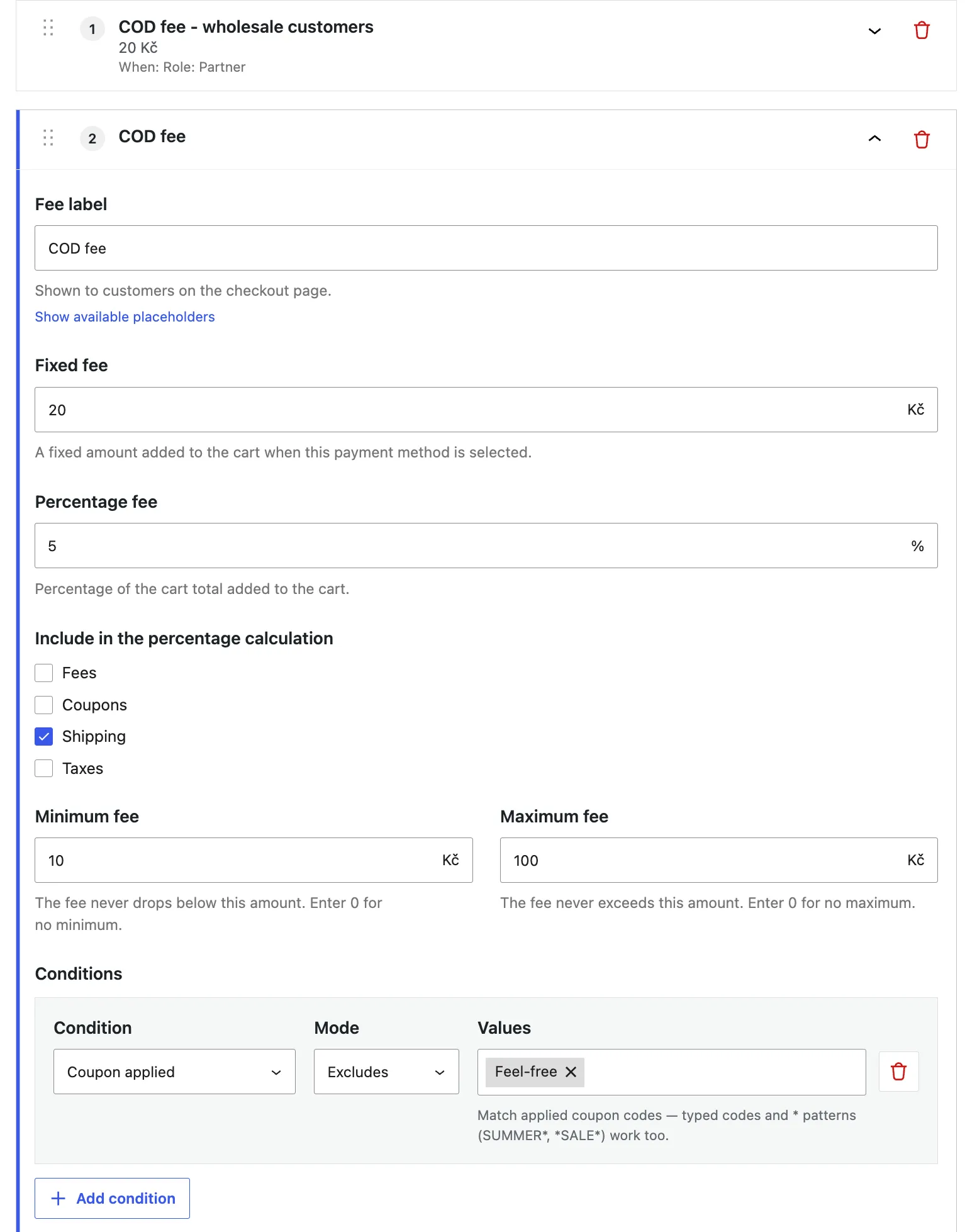
Nine things a rule can look at
- Cart total
- Coupon applied
- Product in cart
- Category in cart
- Country or state
- Customer role
- Shipping method
- Shipping zone
- Shipping class
Each one matches or excludes a list; the cart total takes an “at least” or “at most” amount. Coupon codes and shipping methods accept * wildcards, so one rule can cover every SUMMER* coupon.
Order matters
- Small baskets — under $50$2.00
- Export orders — outside CZ3%
- Everything else2.5% + $0.50
Rules are checked top to bottom, and at most one is charged — the first whose conditions match. If none match, there is no fee. Drag to reorder, or leave the last one unconditional as a catch-all.
What users say on WordPress.org
Still 4.7 out of 5, 13 years in: from 71 reviews on WordPress.org, checked 31 August 2026.
Should be renamed to Pay and Discount — read this review on WordPress.org (opens in a new tab)
“Super flexible and useful… add a fee to one payment method, while another grants a discount when selected.”
Just Perfect! — read this review on WordPress.org (opens in a new tab)
“Does exactly what it says, lightweight, and even a monkey can use it.”
Great plugin with very good Support — read this review on WordPress.org (opens in a new tab)
“It works with the latest versions of the checkout in WC.”
Good — read this review on WordPress.org (opens in a new tab)
“Wonder, why this is not the default functionality of Woocommerce core…”
Very happy with it — read this review on WordPress.org (opens in a new tab)
“Does what it says, fast and simple. Never had an issue, good job!!”
Great plugin, good support — read this review on WordPress.org (opens in a new tab)
“How to do this is well documented and Karolina’s help is awesome.”
What Pro costs
No feature is held back for a higher tier — you're only paying for the number of sites you run it on.
For one store you own and run.
Buy Pro — single-site licenceFor a handful of client stores. $19.80 per store.
Buy Pro — 5-site licenceFor agencies running it as standard on every build.
Buy Pro — 25-site licenceBuy the annual plan — $199 / year — 25-site licenceNot ready to buy? Start the 7-day trial — no card is taken, and it ends on its own.

Frequently asked questions
The ones that come up most. The complete FAQ has all of them, including licences, refunds and renewals. If yours isn't in either, write to me.
Why does a fee already show on the cart page?
Because the cart doesn't know yet which payment method your shopper will pick, so it shows the fee for whichever one is listed first. That fee updates as soon as they choose a method at checkout. Two fixes: put a fee-free method first in your list — works in the free version — or use Pro to hide the fee on the cart page entirely.
Does it work with the block checkout?
Yes, and the total updates live when the shopper changes payment method. One known limitation: the Checkout block has to sit in the page content rather than in a template part for that live update to fire. Every other limit is written down too.
I'm on version 2.x — do I have to reconfigure anything?
No. Your settings migrate themselves the first time 3.0 loads, and the old values stay where they were, so rolling back still works. Every developer filter kept its name and signature — a snippet written years ago still runs.
How does the fee reach my accounting?
As an ordinary WooCommerce fee line, tagged with the gateway it came from and where it was written, so it shows in wp-admin, on customer emails and in exports. If your invoicing plugin ignores fee lines, Pro can write it as a product line instead.
What about orders I create by hand, or a pay-for-order link?
WooCommerce never runs cart fees in either place. Pro writes the fee there itself.
A card payment failed and the customer paid by bank transfer instead — which fee is on the order?
On the free plugin, none: when the customer switches method on the pay-for-order page, the card fee is removed and WooCommerce never runs cart fees there, so nothing replaces it. Nobody is charged for a method they did not use. On Pro, the bank-transfer fee: the old line is replaced by the right one, and the pay-for-order page shows each method's fee and the resulting total before they pay.
Is tax handled correctly?
You choose whether the fee is taxable, which tax class it uses — including the highest class already in the cart — and whether the amount you typed includes tax. VAT-exempt customers are never charged tax on the fee.
What if Pro turns out not to be for me?
You are covered three times over. The free version (opens in a new tab) stays free and keeps working whatever you decide; the 7-day trial takes no card at all; and if you do buy and change your mind, refunds run 14 days, no argument.
What do I need to run it?
PHP 8.0 or newer, WordPress 6.2, WooCommerce 7.7.0. HPOS is declared, WPML translates the fee title, the admin ships in eight languages, and five multi-currency plugins are supported: Price Based on Country, CURCY (Multi Currency for WooCommerce), WCML, FOX (WOOCS), and WooCommerce Multi-Currency when the store currency is USD. The full compatibility list has the versions each one needs.

Who maintains this plugin
This plugin has been on WordPress.org since 2014. I took it over in 2017 because I kept installing it on client stores and wanted it to stay maintained. Since then, every line of code, every doc page and every Pro support reply has been mine.
Pro is what pays for that. Try it for 7 days; if it doesn't earn its price back, the free version is right where you left it.
 — Karolína Vyskočilová, kybernaut.cz (opens in a new tab)Photo: Janis Voudouragkakis, Taka Tuka Photo