DocumentationConfiguring feesTax handling
Tax handling
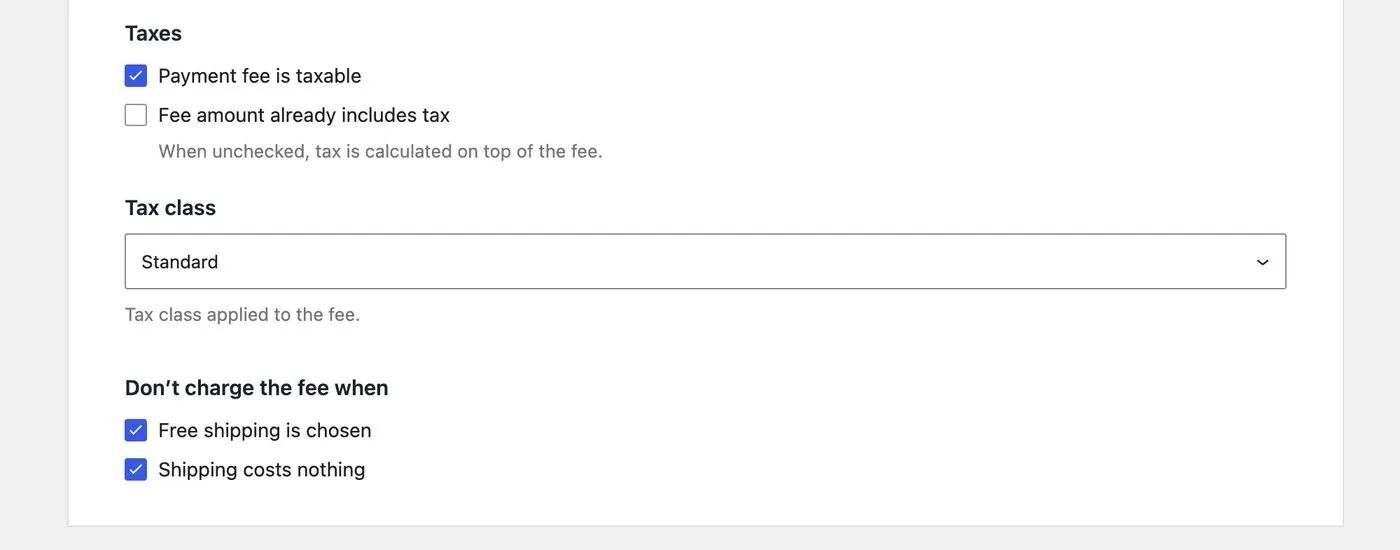
A payment fee is taxed like any other WooCommerce fee. Three settings on the payment method decide how: whether it is taxable at all, whether your amount already includes tax, and which tax class it uses.
The three settings
All three live on the payment method and apply to every fee rule on it. They appear only when WooCommerce tax calculation is switched on.
Payment fee is taxable. Off by default: the amount is charged as it stands, with no tax line. Turn it on and WooCommerce taxes the fee at the class below.
Fee amount already includes tax. On by default. WooCommerce stores every fee excluding tax and adds the tax back when it shows the order, so with this on the plugin divides the tax out of the number you typed first: a tax-inclusive 3.25 at 21 % is stored as 2.69 and the customer still sees 3.25. Off, and 3.25 is stored as 3.25 and the customer sees 3.93.
Tax class. Any class the store has, or Inherit from cart items. The default is the standard rate.
Inherit from cart items
WooCommerce has no such class; the plugin resolves it. The fee takes the class of the cart item with the highest rate, so a basket mixing 21 % goods and 10 % books taxes the fee at 21 %. An empty basket — a fee on a shipping-only order, say — falls back to the standard rate.
Since 3.0 this works whether or not your amount includes tax. Version 2 only did it for tax-inclusive amounts and fell back to the standard rate otherwise, without saying so. It is the one place an upgrade can change what tax a fee carries — the upgrade notes cover it.
Worked example
A basket of a 100 item at 21 % and a 10 book at 10 %, prices excluding tax, percentage base the plain subtotal. The fixed amount plus the percentage of 110 comes to 3.25, and the inherit class puts the fee on the basket’s highest rate. What the “includes tax” switch does from there:
Includes tax — on
- Fee works out to3.25
- Tax divided out, ÷ 1.212.69 stored
- Tax added back at 21 %0.56
Customer sees3.25
The customer pays what the rule works out to.
Includes tax — off
- Fee works out to3.25
- Stored as it is3.25 stored
- Tax added on top at 21 %0.68
Customer sees3.93
The customer pays that, plus the tax on top.
VAT-exempt customers
A customer WooCommerce marks VAT-exempt — an EU business with a validated VAT number, through the EU VAT plugins that set it — is never charged tax on the fee, whatever the three settings say. The fee itself is still charged.
Which amount they pay depends on the includes tax switch above. A fee whose amount excludes tax is charged as typed. A fee whose amount includes tax names a gross price, so the exempt customer pays the net inside it: enter 12.10 with a 21 % rate and everyone is charged 10.00, plus 2.10 tax for those who pay tax. Version 2 charged the exempt customer the whole 12.10 instead, which left them paying more than anyone else; 3.0 corrects that.
One exception runs the other way. A negative fee — a discount — is taxed by WooCommerce’s own rule, spread across the basket’s tax classes, whether or not you marked the fee taxable. VAT-exempt customers are still excepted. The discounts page works it through.
Tax in the percentage base
Separate from all of the above: the Taxes checkbox under the percentage fields adds the cart’s tax to the base the percentage is taken from. It is on by default, as in version 2 — a 2 % fee on a 100 basket carrying 21 tax is 2 % of 121. The percentage base page has the four options.
A fee taxed at a rate you did not expect? Send me the basket and the three settings and I will tell you which one did it.
Get in touch